How to Hack Whatsapp

Posted by Unknown Selasa, 19 Februari 2013 0 komentar

An theoretical approach to hack whatsapp


Whatapp

Many of my friends were like "Dude u on whatsaap?".

I got that question from many of my friends. So finally decided to download "whatsapp".
Even u guys should try it out, if u haven't tried it yet!

So i have been using this app from past 3 days, and i got value idea about how it works and how it authenticates You as You.

If you people would have observed -

1. You can read all the messages Offline o.O
2. You can access all d profile pictures offline.

But Whatsapp encrypts all d DATA. But guys "hold on". Obviously it can be decrypted or any other way to access all d messages..

"" There's always a way "" :D

Here what 'm going to talk about is not just getting there messages which can be accessed offline.
'll add that with video or screenshot in my next post :p

The method which i thought about when i was writing my "exams in coll 2day" is interesting..
And YA while writing exam.. Lol :D Cant help it ...
That's ME :p

Enough of Stories and background on whatsapp and Myself :p

Lets Get into Tech stuff


Its theoretical because i haven't tried it.
I'll try it and post with video or screenshots s00n :-)

Ohk guys, lets get busy


So if you people have observed you can not have your whatsapp account logged in in two devices. Means session is given to only 1 mac address. If the MAC [ Media Access Control ] address of the device requesting access changes then whatsapp asks you to re-verify your account! 

And common, "whatsapp people" you think Mac address cant be spoofed. But yeah Nice try whatsapp developer's :p

So here d point you will have to get access to the phone to get the victims phone "MAC address + the verifying massage" which is received to verify your device.

Simple you code a app to get the user's MAC address and checking the message from whats app in the victims inbox. Very easy in case of android devices.

As soon the message s received Push the "MAC address" + "Verifying code" to your server or mail it your ID. That depends on your convince.

That's it guys.

Spoof your phone's MAC address to your Victims address and install whatsapp and type the "verify code".

And done guys. You get complete access to the victims whatsapp ID..
where as you can keep spying/watching your victims movements :D
i.e 2 people - U + ur victim are using the same ID from different devices.

But its very LAME to spy on other people's private messages. So try not to.

This article is just an theoretical approach and only for understanding and knowledge purpose.
And 'm not responsible for any thing you do after reading this post :D :p

I have no clue up-to which extent the approach will work.

Any ways Thanks for reading this post.
Hope you people enjoyed it..

I look forward for your comments so that the flaws in method can be found out and rectify because even 'm not a gr8 hacker :p
Even 'm a beginner .

Happy Hacking..
Happy Coding :-)


Baca Selengkapnya ....

LINK2SD

Posted by Unknown Kamis, 14 Februari 2013 0 komentar

Tutorial: A Guide to Link2SD for Android

Tutorial:  A Guide to Link2SD for Android
Link2SD is an android application by Bulent Akpinar that lets you move apps and games to the 2nd partition of your SD card. Why do we have to use Link2SD when Froyo and Gingerbread’s Native Apps2sd moves the files to the SD card? Native apps2sd only moves the apk file of the application leaving other files in internal memory thus you still have to manage your on-board memory and limit your choice of apps because it will eat up your memory and later on you cannot install any files anymore. Additionally, widgets and some applications are not intended to be moved to the SD card. However, Link2SD is only for root users because it is required that your phone is rooted.
Link2SD
The idea behind the application is the same. But Link2SD has more relevant features which the Native Apps2sd lacked giving Android 1.5 and up users the chance to have a taste of what it’s like to have a big phone memory. Additional features were added by the developer to furher optimize the usage of android devices. By using Link2SD, you can move not only the application file, but also  the dalvic-cache and libray files of the application. This means that data will be the only one left to consume your internal memory thus installing applications and games would be easier because you can install anything you want without worrying about the famous low memory problem. Furthermore, Link2sd covers all files even moving widgets and the unmoveable applications to the 2nd partition of your SD card.
This is a step by step guide on how you can run Link2SD on your device. This tutorial will work for both stock and cutom ROMs. For ClockWorkMod Recovery users, you can check the other guide below. Follow all the instructions carefully to eliminate possible problems.
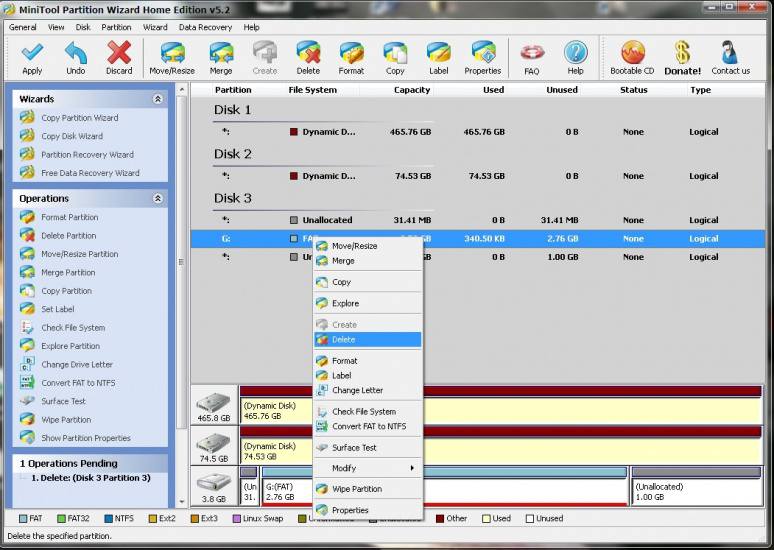
  1. First you have to download Mini Tool Partition Wizard Manager. You can download it HERE.
  2. Insert your SD card to a card reader and open it on your computer.
  3. Back up all your files to the computer because partitioning will wipe your data.
  4. Open Mini Tool in your computer. Locate your SD card (be careful in choosing and make sure not to choose the drive of your computer)
  5. Right click and choose Delete.link2sd 3
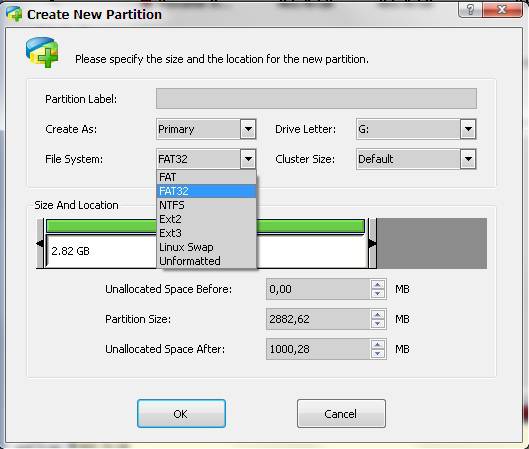
  6. Right click on it again and choose Create New. Create “FAT32″ partition (This is where all your media files will go. Be sure to make it bigger than the 2nd part)
  7. Select “Create as: PRIMARY” link2sd 4
  8. Next, create an ext2/ext3/ext4 partition (if you’re on stock ROM, choose ext2). This is where your apps will go. I suggest a value of 512Mb or 1Gb would be big enough but if you insist you can go as high as 2Gb.
  9. Select “Create As: PRIMARY” (make sure that it is both set to primary because it will not work if it is not set to primary) link2sd 5
  10. Click the “Apply” button on the top left corner and wait for it to finish the process. Done.
  11. Put back your SD card to your phone and switch it on.
  12. Download and install Link2sd from Google Play Store.
  13. Open Link2sd. You will be prompted to choose between ext2, ext3, ext4 and FAT32. Select ext2. link2sd 6
  14. It will say mount script created. Reboot your phone now.
  15. Open link2sd and if the message doesn’t show up, you succeded.
  16. Go to Link2sd>Settings>check the autolink (to automatically move apps upon installation)
  17. If you already have some apps, select “move to phone” then after moving select “Create Link” (be sure to check the three files: app, dalvic-cache and library files)
  18. link2sd 2link2sd
  19. To check your memory, select “Storage Info”. This will show you the current state of your internal memory, FAT32, and ext2 partition.                                                                                            link2sd 7
  20. Now you’re done and ready to install vast amount of applications as you wish!
FOR CLOCKWORKMOD RECOVERY USERS ONLY( ALTERNATIVE METHOD)
NOTE: You can also use the instructions above. This guide will work on both stock and custom ROMs.
  1. Back up all your files to your computer. Partitioning wipes the files of your SD card.
  2. Go into recovery mode
  3. Select “Advanced”
  4. Select “Partition SD card”
  5. Choose your SD-ext size (if you’re using a 2Gb SD card, choose 512Mb. If your SD card is 4Gb or greater, you can choose 1024Mb)
  6. Select 0 swap
  7. Wait for the process to finish. Reboot.
  8. Download and install Link2SD from Google Play Store.
  9. Open Link2SD you will be prompted to choose between ext2, ext3, ext4 or FAT32. Choose ext4.
  10. Follow instructions number 14-20. DONE!
Having troubles? Feel free to comment and post your questions below. Enjoy! :)


SORCE: http://www.noypigeeks.com/android/tutorial-a-guide-to-link2sd/#ixzz2KwL76X2d

Baca Selengkapnya ....

SwiftKey 3

Posted by Unknown Rabu, 13 Februari 2013 0 komentar

SwiftKey 3 Keyboard

Description

SwiftKey 3 Keyboard
Get SwiftKey 3 – the best keyboard on Android!
#1 selling app in 38 countries - over 2 million sold
70,000 5✮ reviews
Multiple award-winner, including “Most Innovative Mobile App”
Don’t miss out – get SwiftKey today
✮ Webby Awards People’s Voice Winner for Innovation, 2012 ✮
✮ Mobile World Congress Award Winner for Innovation, 2012 ✮
Meet the world’s smartest touchscreen keyboard for Android.
SwiftKey 3 understands how words work together, giving much more accurate corrections and predictions than other keyboards. Very sloppy typing will magically make sense, even if you miss spaces, and SwiftKey 3 also predicts your next words.
SwiftKey 3 learns the words and phrases you use, and how you interact with your keyboard as you use it, to make typing easier and even more accurate over time. You can also personalize it using your Gmail, Facebook, Twitter or blog posts.
SwiftKey is among Android's best selling apps for a reason -- it transforms your keyboard, making typing a breeze and saving you hassle every day.

~~~
See our FAQ, support and ideas forum at http://support.swiftkey.net/
We take your privacy very seriously. This app does not learn from password fields and all language data learned on your device is stored on your SD card and never transferred.
Internet connection permission is required to install this app, so that language module files and cloud personalization data can be downloaded.


DOWNLOAD HERE:swiftkey 3

Baca Selengkapnya ....

DOWNLOAD VIDEOS USING YOUR ANDROID DEVICE

Posted by Unknown Minggu, 10 Februari 2013 0 komentar
DOWNLOAD YOUTUBE VIDEOS USING YOUTUBE VER. 2.1.6 AND MOVIE DOWNLOADER 1.0.0

REQUIREMENTS:
  •       ANY ANDROID DEVICE
  •         YOUTUBE 2.1.6
  •         MOVIE DOWNLOADER 1.0.0
  •         INTERNET DOWNLOAD MANAGER (IDM) 
  •         AND INTERNET CONNECTION

DOWNLOAD LINKS:
      
         YOUTUBE:HERE
         MOVIE DOWNLOADER:HERE
         IDM:HERE


WATCH THIS FOR TUTORIAL:

------------------------------------------------------------------------------------------------------------


Baca Selengkapnya ....

increase 10 times your download speed using Internet Download Manager

Posted by Unknown Jumat, 01 Februari 2013 0 komentar

 Internet Download Manager 6.14 by android-overload.blogspot.com

TO MAKE THE STORY SHORT...GUYS FOR YOU TO DOWNLOAD ALL DATA FILES IN SUPER SPEED YOU NEED TO USE THIS...INTERNET DOWNLOAD MANAGER OR ALSO KNOWN AS IDM..HAPPY DOWNLOADING(SORRY FOR SLOW UPDATE EVERYONE)
OR READ THIS

Internet Download Manager (IDM) is a tool to increase download speeds by up to 5 times, resume and schedule downloads. Comprehensive error recovery and resume capability will restart broken or interrupted downloads due to lost connections, network problems, computer shutdowns, or unexpected power outages. Simple graphic user interface makes IDM user friendly and easy to use.Internet Download Manager has a smart download logic accelerator that features intelligent dynamic file segmentation and safe multipart downloading technology to accelerate your downloads. Unlike other download managers and accelerators Internet Download Manager segments downloaded files dynamically during download process and reuses available connections without additional connect and login stages to achieve best acceleration performance.
Internet Download Manager 6.14 Final Repacked - Preactivated - Silent Installation + Increases Download Speed

 Internet Download Manager 6.14
ADDITIONAL INFORMATION FOR EVERYONE:
SO HOW TO REGISTER YOUR NAME ON IDM?


FOLLOW THIS STEPS


1. Go to start


2. Run

3. type regedit

4. Go to this path "HKEY_LOCAL_MACHINE\SOFTWARE\Internet Download Manager" or "HKEY_LCURRENT_USER\SOFTWARE\Internet Download Manager"

5. Inside IDM you will see "FName,LName" Double click or right click and select Modify

6. Then input all your desired name Name

7. Ok


NOW OPEN YOUR IDM AND GO TO Help > About IDM

AND VIOLAA! CONGRATULATION,YOUR IDM WAS SUCESSFULLY REGISTERED


Baca Selengkapnya ....

FIFA 2012 v1.6.01 APK + Data (Offline)

Posted by Unknown 0 komentar
[Android] FIFA 2012 v1.3.96 APK + Data by EA Sports Full


FIFA 12 is almost like its big PC and console brothers, delivering one of the most immersive experiences to date with perfect controls,
amazing graphics and all the authentic soccer action for true sport fans.
With a variety of different gaming modes from leagues to cups and of course, quick matches,
this game can be played for short or long bouts, ensuring a variety of diverse options for the player.


FIFA 2012 is a visual treat with console-like graphics. This is not a cut down version of the
FIFA series but as mentioned a fully blown graphical experience with realistic player movements and ball physics.
Stadiums look realistic and as do the lighting effects with lots of advertising for EA and Sony Ericsson.
Music and commentary is equally as impressive as are the soccer effects from the field and the roar of the crowd.
This games comes together perfectly for gameplay, graphics and audio.


If you're a soccer fanatic, then FIFA 2012 is a must have game for your collection.
Even if you're not a sporting fan, there's really no excuse not to download this game.
This game is best darn soccer game in the portable gaming world at the moment.


Instructions: 
+ Install the APK
+ Download all data parts
+ Use this simple tool to join the data parts (select "splice" and choose the input file)
+ Use winrar or 7zip to extract the data
+ Copy the extracted data to sdcard/android/data/
+ Run the game

If the game is FC, please try this alternative: 
Here is the link to 2 new apks (1 online and 1 offline): online, or offline
Just remove your previous installation (but keep the data so that you don't need to download it again). Then, follow these steps:
1. Install the APK Online
2. Make sure that your data is in this folder sdcard/Android/data/com.ea.game.fifa12
3. Run the game for the first time, then exit
4. Over-install the APK Online with the APK Offline
5. Turn of Wifi/3G
6. Play the game.

List of supported Android devices:
- HTC Desire HD
- HTC Desire Z
- HTC Evo 3D
- HTC EVO Shift 4G
- HTC Incredible 2
- HTC Incredible S
- HTC Inspire 4G
- HTC My Touch 4G
- HTC Sensation
- HTC Thunderbolt 4G
- LG P920 Optimus 3D
- LG P920h
- LG P925
- LG P925g
- LG P929
- Motorola Droid X
- Motorola MB860 Atrix 4G
- Motorola Xoom
- Samsung GT-i9000 Galaxy S
- Samsung GT-i9000B Galaxy
- Samsung GT-i9000T Galaxy S
- Samsung GT-i9001 Galaxy S+
- Samsung GT-i9003 Galaxy SL
- Samsung GT-i9003L
- Samsung GT-i9100 Galaxy S II
- Samsung GT-i9101 Galaxy S II
- Samsung GT-i9103 Galaxy R
- Samsung GT-P1000 Galaxy Tab
- Samsung GT-P7500
- Samsung GT-P7510
- Samsung Galaxy Note
- Samsung SCH-i400 Atlas
- Sony Xperia Arc
- Sony Xperia Neo
- Sony Xperia Play
- Sony Xperia Play R800x

Download FIFA 2012:
Part I | Part II | Part III | Part IV | Part V | Part VI


Common Issues:
Problem: The graphic of the field is not green as nornal, but many colors.
Solution:
(i) If your phone is rooted, try to install Chainfire3D and go to "DefaultOpenGL" and set ONLY "Unroll Textures".
(ii) OR delete my provided data and try to download new data via Wifi.

Baca Selengkapnya ....

NBA 2K13 1.1.2 offline Apk for Android

Posted by Unknown 0 komentar
NBA 2K13 1.1.2 offline Apk for Android 

NBA 2K13 Apk Version: 1.1.2 offline Size: 1.2G Required: Android 4.0 and up Release time: 2012-10-03 Developers: 2K Games, Inc.
Overview:
Enter the New Dynasty with NBA 2K13, the latest installment of the top-rated NBA video game simulation franchise 12 years running.


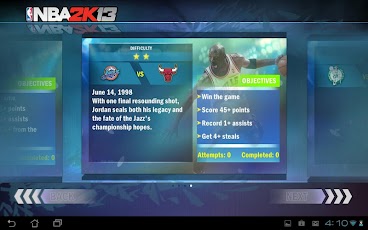
Built on the critically acclaimed NBA 2K engine, NBA 2K13 for Android features improved graphics and intuitive One-Finger controls to give you the ultimate NBA experience while on the go. NBA 2K13 also lets you relive some of the most memorable performances in NBA history, including Kobe Bryant’s 81-point performance in 2006. Executive produced by multi-platinum recording artist JAY Z, who personally curated this year’s soundtrack.
Features:
- Intuitive Controls: Choose between classic control and One-Finger control, built specifically for mobile devices.
- Improved graphics and animations.
- NBA’s Greatest Games: Relive some of the best performances in NBA history, including Kobe Bryant’s 81-point performance in 2006.
- A JAY Z Production: Featuring a soundtrack personally curated by multi-platinum recording artist JAY Z.
- Multiseason Mode: Play through multiple NBA seasons and establish your team as a dynasty.
- TV-style presentation, including full commentary from Kevin Harlan and Clark Kellogg.
- Updated Rosters - All transactions from the 2011-2012 season have been incorporated, meaning you will be playing with current teams and ratings.
Visit 2kgames for more great games. 


What's in this version:
- Bluetooth Multiplayer available
- Improved Gameplay AI
- Bug fixes
Install APK for non-rooted
Copy 'com.t2ksports.nba2k13android' folder to 'sdcard/Android/Obb' or Download via Wifi
Launch the Game (Run online at first run)

apk 1.1.2
mirror1 
mirror2 

Data v1.1.2 Download
mirror1 
mirror2 


Older versions
Apk v1.0.9 for non-rooted 

1.0.9pak download 
mirror2 
mirror3 
data 1.0.9 download
data mirror1
data mirror2
Instructions : (Non-Root/Offline)
Install APK for non-rooted
Copy 'com.t2ksports.nba2k13android' folder to 'sdcard/Android/Obb' or Download via Wifi
Launch the Game


Apk v1.0.6 for non-rooted
apk 1.0.6 download 
apk mirror1 
apk mirror2 
Data Download zippyshare
part1 
part2
data mirror 
data mirror2

Apk 1.0.6 for rooted: 
apk 1.0.6
apk 1.0.6 mirror

Titanium Backup files: 
tb file
tb file mirror

Instructions : (Root/Offline)
Install the APK for rooted
Download and Copy 'com.t2ksports.nba2k13android' folder to 'sdcard/Android/Obb'
Download and Copy 2 files in Titanium Backup folder to 'sdcard/Titaniumbackup' and Restore 'Data only'
Launch the Game
Instructions : (Non-Root/Offline)
Install APK for non-rooted
Copy 'com.t2ksports.nba2k13android' folder to 'sdcard/Android/Obb' or Download via Wifi
Launch the Game 

Baca Selengkapnya ....

Trik SEO Terbaru support Online Shop Baju Wanita - Original design by Bamz | Copyright of samsung galaxy s2.