You can change HTC sensation theme with SENSE 3.0 SKIN

Posted by Unknown Senin, 12 Desember 2011 0 komentar
If you have an android htc sensation smartphone,you can easyly change its theme. I have tried so much and found this apps. SENSE 3.0 SKIN is a great program to do it. You can download it from android market.


https://market.android.com/details?id=com.skin.MikMik&hl

Baca Selengkapnya ....

Top 10 free android apps for keeping touch with friends and family

Posted by Unknown Minggu, 11 Desember 2011 0 komentar

Nowadays, more and more people prefer to send the text to mobile phone and leave a message on Facebook or twitter. Obviously, with the apps on smart phone, you can keep touch with your friends and family conveniently. In this post, I will introduce you top 10 free practical but funny social apps to help you to manage your relationships much easier.

Top 10:  Tumblr
Tumblr is home to the most creative people in the world. With this app, you can 1) Post anything: Share photos, video, quotes, chats, links, and text. 2) Advanced controls: Save drafts, queue posts, customize tweets, and more! 3) Messages: View and reply to messages. 4) Address book: Find people to follow from your address book. 5) Multiple blogs: Seamlessly manage all of your blogs.

Top 9: Foursquare
Foursquare helps you explore the world around you. Keep up with friends, get insider tips, and unlock discounts and rewards. While on the go, you can easily tell friends where you are, share pictures, get their comments ("I'm right around the corner, I'll stop by to say hello"), and get insider tips ("order the Lobster Ravioli; it's the best dish by far."). Tons of places offer discounts and freebies to foursquare users, and you earn points and badges for doing the things you love.

Top 8: Bump
Bump two phones together to share photos, contacts, and apps! Bump™ makes sharing with people as simple as bumping two phones together. Just pick what you want to send, then hold your phones and gently bump hands with another Bump user. Share photos, apps, and contacts. And after you bump, keep sending messages anytime, anywhere, complete with instant notifications. It's like free texting!


Top 7: FunForMobile Ringtones & Chat
This app is mainly about make friends; Chat, Talk, Play; Download wallpaper, ringtone, video made by other members. Share jokes, photos, videos, and ringtones.

Top 6: TextPlus Free Texting
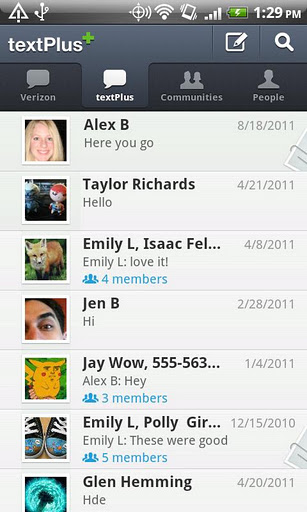
textPlus is an application for mobile devices that allows its users to send and receive text messages, both on a one-to-one basis and in groups, all for free. textPlus is free to download and free to use (meaning you will not be charged for the text messages you send or receive using the textPlus application)

Top 5: TiKL - Touch to Talk
This app allows the users to instantly talk or text to one or a group of friends at once with the touch of a button. No setup needed, just have them in your phone contacts or as Facebook friends. Fast, simple and free - TiKL turns your phone into the ultimate Push To Talk (PTT) Walkie Talkie with instant messenger capability.

Top 4: Google+
I think this app do not need too much introduction. It’s from Google official development. Google+ for mobile makes sharing the right things with the right people a lot simpler.

Top 3: Tango Voice & Video Calls
This is a free Voice and Video Calls app. Tango allows you to make free phone calls and free video calls over 3G, 4G, and Wi-Fi. Make calls to any other person who has Tango installed on their PC, phone or tablet. Start a Tango call with just voice, and easily move into a video call when you have something to share. It’s easy to use, it’s fun, and it works.

Top 2: Twitter
It’s an official Twitter app for Android like as Google+. With this app, you can follow your interests: instant updates from your friends, industry experts, favorite celebrities, and what’s happening around the world. Everything is the same as webpage version.

Top 1: Facebook
Obviously, the top one social app is Facebook! Facebook for Android helps you connect with your friends and share on the go. Upload a photo, keep up with friends’ photos and status updates, look up a phone number, and more – right from your Android device.

If you find one or more apps what you are interested in, just go to android official market, and search to download.


Baca Selengkapnya ....

How to Hide the WiFi brought you by Google

Posted by Unknown 0 komentar
As you know that Google is using the StreetView Car collected "by mistake" data from various WiFi networks.The collection, in the words of Google, was only open networks and data was collected log file, SSID and MAC address. This always happened, whether this time the data was a bit more.Why is that?As you know, each network has the IP address that represents. Not much different from actual addresses us, so if anyone knows the IP, we know in which area we live. 

This exploits the Google linking IP to the network SSID. When we find ourselves within the scope of this network, the system automatically knows which area we are making it easier to locate if you want to open the Google Maps.How would you avoid?For those who embarked in this case, Google itself provides the solution to remove the network from their catalogs. All you have to do is add the SSID (network name we say), the suffix "_nomap". For example, if our network is called "androidphonedriver", you should rename to "androidphonedriver_nomap".

Worth it?That is the question! The Google already has tons of our personal data. Music, Video, Docs, Mail, and many more things we do every day through its services, making you wonder if it's worth. My opinion is that it is and should be doing. If every time these companies offer a "little mistake" and to forgive, to 10 years will have 10 different lists with our habits we do not want to share. I agree that they already know too much about us but we chose them to give. But no!

Baca Selengkapnya ....

HTC Magic Android sfr how to use it without full internet package

Posted by Unknown Sabtu, 10 Desember 2011 0 komentar
The HTC Magic is a smartphone type mobile phone that runs on the Android operating system. Currently sold by several mobile operators, it can be used to browse the Internet, check email or to access online applications such as, but sometimes under certain conditions. The trick described below shows how to set up a WAP profile will be used for SFR SFR customers who have a package Illimythics but do not have access to full Internet option.


HTC Magic Android
 The functions available depending on your plan

 Contrary to what is explained by the SFR customer service (it's live) is not required to take out the option of Full Internet Illimythics. So the device is used with basic packages providing access internet (via WAP access SFR) as Illimythics base.

 Important: Obviously this means that some functions will not be accessible via the 3G network such as downloading, Android Market or video playback but access to Web services and type of Google webapps will be operational no extra cost. All these services will, however, blocked 3G access via a WiFi network (can be activated on all devices) which is more than enough. ex: If you use a webmail message type, for example you can easily access the browser, but POP3 access to meet their mails via the application of the phone will require wifi.

 The trick is described in the customer service web site of SFR (Home> My Account> My phone and my SIM card> Setting WAP / MMS) and requires manual configuration of the access point.

 Configure the WAP profile in SFR Android

 If you do not pass Illimythics 3G + Full Internet (and any other contract) you will use the WAP profile SFR 

The procedure is as follows:

 On the phone, press the Menu button.
 Select Settings> Wireless Controls> Mobile Networks> Access Point Names.
 Press the Menu key and select New APN.
 Select Name, enter WAP SFR and press OK.
 Select APN, enter wapsfr then press OK.
 Select Proxy, enter 195.115.25.129 and press OK.
 Select Port, enter 8080 and press OK.
 Leave blank (not defined) for Username, Password, Server
 Select Type APN (access point name), enter default and press OK
 Press the Menu key and select Save.
 Press the radio button next to WAP SFR to define the new profile as default profile.
 Press the Home button.
 Press tab and select Application Navigator.
 Press the Menu key and select More> Settings> Set home page.
 Enter http://live.vodafone.com then press OK.

 Press the Home button.The settings are now implemented and ready for use

Baca Selengkapnya ....

HP TouchPad Run Android 4.0 Now

Posted by Unknown 0 komentar
After HP announced that it had gave Touchpad up, and never produced again in this summer, this tablet reduced the price to only $99 to sold off the remaining stock. I believe that some of the customers want to switch this tablet to a cheap Android device.  So with many difficult solved, about one month ago, hackers had run CyanogenMod 7 on Touchpad successfully with audio and Wi-Fi still cannot work.

And now, developers have made a breakthrough to port the Android 4: Ice Cream Sandwich to TouchPad tablet. One team member has posted a photo of Ice Cream Sandwich running on his devices to prove that.  This post is already generation excitement and interest on the forums although it shows that the last version of Android 4.0 for TouchPad still not so stable. Sooner the community provided a patch for making touch input work on tablet. And this community claimed that the next priorities for the firm will include WI-FI and Android Market support.

While developers scramble to fix the bugs in the TouchPad Android firmware, however, yesterday’s announcement by HP that it would be open sourcing its WebOS software has led to a surprise reverse phenomenon of developers now hoping to port the operating system to Android devices.  But right now, most developers prefer to build Android apps.

Baca Selengkapnya ....

BlackBerry Milan: First Picture

Posted by Unknown Kamis, 08 Desember 2011 0 komentar
The image of the future unofficial BlackBerry suggests a simple design and the disappearance of buttons and the navigation pad.

 With the arrival of the BlackBerry OS 10 (formerly called BBX), RIM is preparing to launch a range of new smartphones. CrackBerry.com has recently unveiled a roadmap for the Canadian firm om are several models with the code names of great cities like London, Lisbon and Milan.


 The site has managed to get a picture of Milan that reveals a slider type smartphone with a landscape screen that slides to reveal a physical keyboard. No hardware specification but has filtered CrackBerry says he learned that the screen of Milan, like those of other models will offer a greater pixel density than the iPhone 4. The photo also shows that the navigation pad and control buttons (answer, hang up, menu ...) typical BlackBerry disappeared.

 According to information from CrackBerry, the Milan is expected to arrive in March 2012

Baca Selengkapnya ....

Android users can detect Carrier IQ

Posted by Unknown Rabu, 07 Desember 2011 0 komentar
Most of mobile phone users want to detect whether Carrier IQ exists on their smartphones or not with the help you applications. For Android, most of the apps in Market cannot stop Carrier IQ from running, but at least some of them can detect and make sure whether the mobile phone is tracked or not.

Carrier IQ, as a process that can stealthily monitor users’ smartphone activity, had aroused the fierce controversy in the past few weeks.  Some see it as a serious threat to users' security and privacy, while others have likened the reaction to mass hysteria generated by the media.

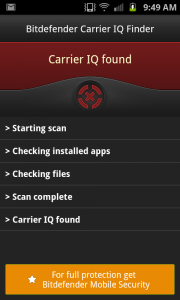
After I searched with Google, I heard that BetaNews had tested out two of the available options to detect the Carrier IQ. One is BitDeferder’s Carrier IQ Finder, and the other one is Lookout Lab’s Carrier IQ Detector. The tests were performed on a Samsung Galaxy S II Skyrocket running Android 2.3.6 on AT&T's network, and both found Carrier IQ present but didn't indicate whether or not it was active.

They also spotted a few apps that claim to freeze the process that runs Carrier IQ's hidden application. These include Trey Holland's Bloat/CIQ Freezer Free and RDMSoft's Carrier IQ Process Killer. Without more extensive tests, they can't independently verify these actually work as advertised, but customer reviews are generally positive.

Baca Selengkapnya ....
Trik SEO Terbaru support Online Shop Baju Wanita - Original design by Bamz | Copyright of samsung galaxy s2.